FactoKit Probe
An OPC UA client for engineers. Browse a server, watch thousands of values, write only after a confirmation, follow alarms and read history.
A small bridge runs on your own computer and talks to the server. Your process data stays on your machine; nothing passes through factokit.com.
- Version
- 0.9.4
- Published
One file, no installation. Not code-signed yet: Windows SmartScreen warns, choose More info → Run anyway. Compare the SHA-256 before you run it. Third-party licences
One file, no installation. Not code-signed yet: Windows SmartScreen warns, choose More info → Run anyway. Compare the SHA-256 before you run it.Unpack the .tar.gz and run factokit-probe. Not notarized yet: macOS stops the first start; open System Settings → Privacy & Security and choose Open Anyway. Intel Mac: take the Intel build from the list below.Unpack the .tar.gz and run ./factokit-probe (it opens your default browser). ARM64 (Raspberry Pi and similar): take the ARM64 build from the list below.All downloads
- WindowsWindows 10 or 11, 64-bitfactokit-probe-0.9.4-win-x64.exe87.3 MBSHA-256
4bcf39c3465ea8e745217bf1384dd9f165f224ed87657359a47c8c9ed077976b - macOS (Apple silicon)macOS 11 or newer, Apple siliconfactokit-probe-0.9.4-darwin-arm64.tar.gz36.1 MBSHA-256
79d2a131757f8afe5f73c1d94e87ce166fa2d4f90e052da0bcd9af3d9e2beaa4 - macOS (Intel)macOS 11 or newer, Intelfactokit-probe-0.9.4-darwin-x64.tar.gz37.3 MBSHA-256
e68732336fa269883bc09f53f5e723d46d2fbbba1711f67d06977779fe6386b2 - Linux x64Linux x64 with glibc 2.28 or newerfactokit-probe-0.9.4-linux-x64.tar.gz40.6 MBSHA-256
aef4eb471ec2d3bde7c29276293ca3d5ad8da2c3b323fd97c00d7cce119ddc57 - Linux ARM64Linux ARM64 with glibc 2.28 or newer (Raspberry Pi 4 or 5 with a 64-bit OS, ARM panel PCs)factokit-probe-0.9.4-linux-arm64.tar.gz40.6 MBSHA-256
6dad277f80e78cdd63d8236218c1366e9a4dc8dbcf87e426b602a495cb49dd3b
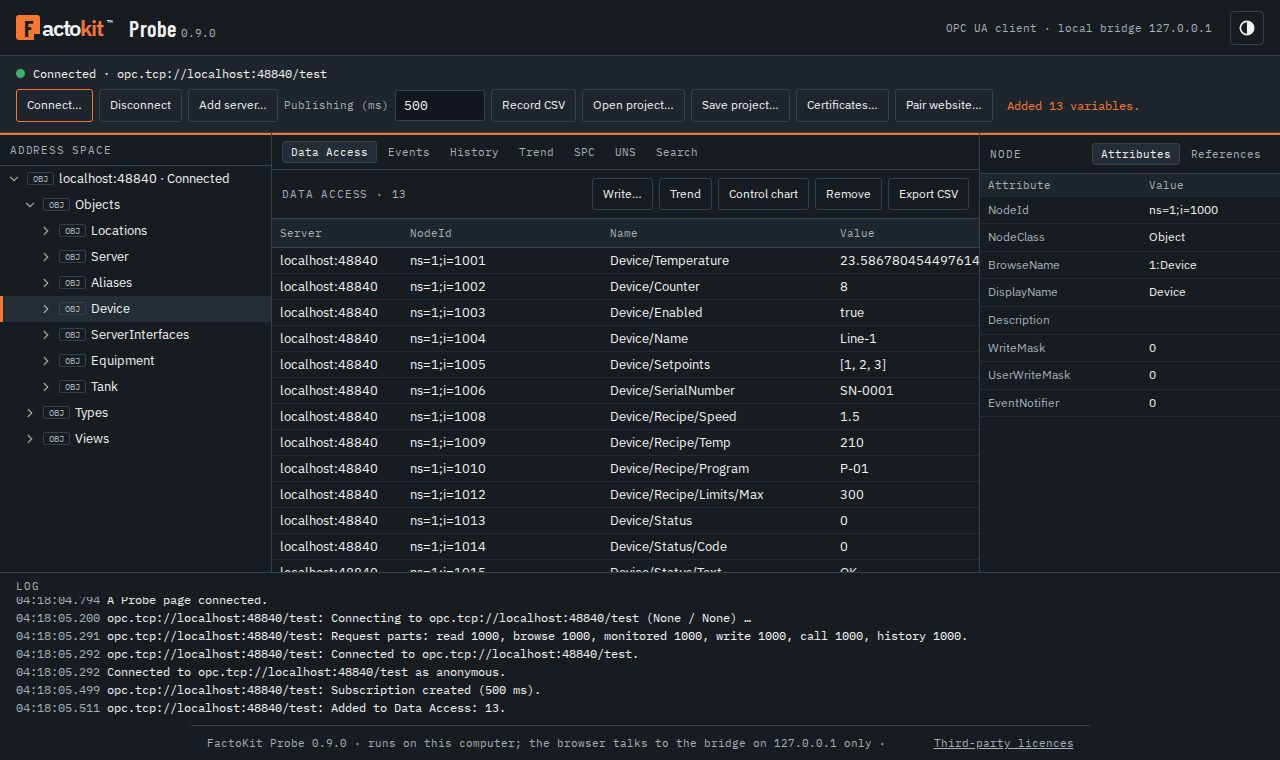
Key capabilities
- BrowseThe address space as a tree with attributes and references; export a branch to CSV, XML, XLSX or NodeSet2.
- Data AccessUp to 10 000 variables in one subscription, live in a table; record every change to CSV.
- Write and callForms that follow the data type, structures included. Old and new value shown; sent only after you confirm.
- Events and alarmsEvent log and current alarms with severity filter; acknowledge, confirm and comment, each confirmed.
- HistoryRaw values or server aggregates for up to 16 variables, as a chart and a table.
- Trend and SPCLive trends with markers; an I-MR control chart and Cpk of a variable while it runs.
- UNS mappingISA-95 topics for the variables, saved with the project and exported as JSON or CSV.
- SecurityNone, Sign or SignAndEncrypt; anonymous, user name or X.509 user certificate; certificates trusted by you.
How the local bridge works
- On your machine. The bridge answers on 127.0.0.1 only; other computers on the network cannot reach it.
- No cloud. The OPC UA connection goes from the bridge straight to the server. factokit.com delivers this page and nothing else.
- Secrets stay local. Passwords you choose to remember and private keys stay in the bridge, never in the browser or a project file: encrypted with Windows DPAPI, or in a file only your user can read on macOS and Linux.
- Nothing written by accident. Writes, method calls and alarm actions show the old and new state, need your confirmation and go to the bridge’s journal.
Requirements
- System
- Windows 10 or 11 (64-bit), macOS 11 or newer (Apple silicon or Intel), Linux x64 or ARM64 (glibc 2.28 or newer). One program, no installation; it runs as your user.
- Network
- This computer must reach the OPC UA server (opc.tcp, often port 4840).
- Browser
- Any current browser for the bridge’s own window. Chrome or Edge to use Probe from this page.
- Data folder
- %LOCALAPPDATA%\FactoKit\Probe: certificates, trust list, journal and remembered passwords (encrypted).
- Servers
- Any OPC UA server with the usual security policies; tested with real PLCs and OPC UA servers.
Browsers
- Chrome and Edge: the first time this page contacts the bridge, the browser may ask whether factokit.com may access apps and devices on this device (local network access). Choose Allow. If you chose Block, change it in Site settings: click the icon left of the address. Tested in Chromium.
- Firefox: not tested with pairing yet. If the page cannot reach the bridge, use the bridge’s own window.
- Safari: pairing from this page is not tested yet. On a Mac, use the bridge’s own window, which works in Safari, or Chrome or Edge. The bridge does not run on an iPhone or iPad.
- Company-managed browsers: a policy may stop websites from reaching programs on your computer; the page then says so instead of waiting. The bridge’s own window at http://127.0.0.1 is not affected, and an administrator can allow https://factokit.com in the browser’s local network access policy.
Connect from this page
- Start the bridge. Run FactoKit Probe on this computer. It opens Probe in your browser and shows a pairing code for this website.
- Work in its own window, or pair this page with it below. Both show the same Probe.
Without the bridge this page cannot reach an OPC UA server.
How FactoKit Probe works
Probe is an OPC UA client in two parts: a bridge (one program for Windows, macOS or Linux: Node.js with the node-opcua library) that talks OPC UA to the server, and the user interface in the browser, served by the bridge itself or shown on this page after pairing. The bridge listens on 127.0.0.1 only; the OPC UA traffic never passes through factokit.com.
What it does
- Connect: the endpoints of a server with their security (None, Basic256Sha256, Aes128_Sha256_RsaOaep, Aes256_Sha256_RsaPss; Sign or SignAndEncrypt), anonymous, user name and password, or an X.509 user certificate. Several servers in one project.
- Browse: the address space as a tree, attributes and references of a node, export of a sub-tree as CSV, XML, XLSX or NodeSet2 XML.
- Data Access: up to 10 000 variables in one subscription, live values in a table, the publishing interval, recording every change to CSV, a project file with the servers and the list (never a password).
- Write and call: the form follows the type (structures from their type definition); the review shows the old and the new value; only the confirmation sends it.
- Events and alarms: an event subscription with a severity and type filter, the event log and the current alarms (ConditionRefresh), Acknowledge, Confirm and comments, each confirmed.
- History: raw values or a server aggregate (processed) for up to 16 variables, with a chart and a table, page by page with Cancel.
- Trend, SPC, UNS, search: a live trend with markers; a live I-MR control chart and Cpk of a variable with the same analysis as the Control charts and Cpk tools; topics of a Unified Namespace for the variables; a search of the whole address space with limits.
Slow PLC servers
- Operation limits: every Read, Browse, Write, Call and monitored item request is split by the server’s OperationLimits; a server that still answers BadTooManyOperations gets parts half the size.
- Browsing: a folder with hundreds of structures is browsed level by level, many nodes per request, with BrowseNext for continuation points, instead of one request per node.
- Structure types are loaded once, only when a structure value is read, not when connecting.
- Keep-alive: a connection is called lost only after three missed keep-alives in a row (or a broken socket), so a busy PLC is not dropped; then Probe reconnects and restores the subscriptions (transfer or re-create).
- Subscriptions are created in parts; a part the server refuses is retried item by item so only the bad nodes are marked.
Security
- Local only: the bridge answers on 127.0.0.1; a request with another Host is refused (no DNS rebinding). Its own page uses the launch token from the address it opens; any other website is refused, except https://factokit.com after pairing.
- Pairing: the bridge window shows a code of 8 letters and digits, valid once and for 5 minutes; this page sends it to the bridge and gets a token for the session. After 5 wrong codes a new code is made.
- Confirmation: writes, method calls and alarm actions take two steps (prepare, then confirm with a one-time id that expires after 2 minutes) and every step goes to the journal.
- Secrets: remembered passwords and private keys of user certificates stay in the bridge, never in the browser or a project file: encrypted with DPAPI on Windows; on macOS and Linux in a file only your user can read (not encrypted).
- Certificates: a server certificate is never accepted by itself; you trust or reject it, and the trust list can be managed.
How Probe is tested
- Real equipment: tested with real PLCs and OPC UA servers.
- Two independent server stacks: the test suite runs against an asyncua (Python) and a node-opcua server, including a PLC-like setup with 468 × 5 variables, OperationLimits of 300 and 20 ms per request, so splitting, BrowseNext and slow answers are exercised, not only the easy path.
- Failure cases on purpose: lost connections and reconnection, subscription transfer, alarms with acknowledge and confirm, history with continuation points, unknown server certificates and writes that wait for confirmation.
- Every release: each build is started on its own system, connects to a test server, browses and reads, and is started a second time on the same data folder before anything is published.
Questions
- Why does FactoKit Probe need a program on my computer?
- A web page cannot open the TCP connection OPC UA uses (opc.tcp). The bridge is a small program for Windows, macOS and Linux that does it: it connects to the server, keeps certificates and passwords, and offers the page an interface on 127.0.0.1 only. The page and the bridge are the same Probe; nothing passes through factokit.com.
- Is it safe to connect Probe to a running machine?
- Reading is the default. Every write and method call, and every acknowledge or confirm of an alarm, shows the old and the new state and is sent only after you confirm it; each step is written to the journal. Still, test on a machine that is safe to change before you write to production equipment.
- Does Probe accept any server certificate?
- No. An unknown server certificate is shown with its details and you trust or reject it; the trust list can be edited later. Passwords you choose to remember and the private keys of user certificates stay in the bridge, never in the browser or in a project file: encrypted with DPAPI for your user on Windows, in a file only your user can read on macOS and Linux.
- Why do Windows and macOS warn about the download?
- The bridge is not code-signed or notarized yet. Windows SmartScreen warns: choose More info, then Run anyway. macOS stops the first start: open System Settings, Privacy & Security, and choose Open Anyway. Compare the SHA-256 of the file with the value on this page first (Windows PowerShell: Get-FileHash; macOS and Linux: shasum -a 256).
- Does Probe work with a Siemens S7-1500?
- It is written for slow PLC servers like it: requests are split by the server’s OperationLimits, browsing goes level by level with BrowseNext, structure types load only when needed and a slow answer is not taken for a lost connection.
- Can the website connect to the bridge?
- Yes, after pairing: start the bridge, type the pairing code its window shows into this page and allow access to devices on your local network if the browser asks. The code works once and for 5 minutes; the bridge accepts the website only from https://factokit.com.
- Which browsers can use Probe from this website?
- Chrome and Edge: allow local network access when the browser asks (tested in Chromium). Firefox and Safari are not tested with pairing yet; on a Mac the bridge’s own window works in Safari. A company policy may stop websites from reaching your computer; the page then says so, and the bridge’s own window keeps working because it needs no pairing.
Related tools
- ISA-95 and UNS topic designer: design the whole namespace the mapped topics belong to.
- Control charts: paste the values Probe copied for subgroups, freezing and the full report.
- Cpk / Ppk capability: non-normal capability and the full report of the same values.
- Modbus tools: the other common PLC protocol: frames, CRC and a serial link.